OneLedger 2.5: a new design, and more precise calculations
OneLedger brings together your accounts, portfolios, property and loans so you can track and project your net worth — with no bank connection, no account to create, and no server. Version 2.5 is the largest release since 2.0: every screen has been redesigned, and several calculations have been refined in specific edge cases.
Let’s start with the visible part.
1. A design rebuilt from top to bottom
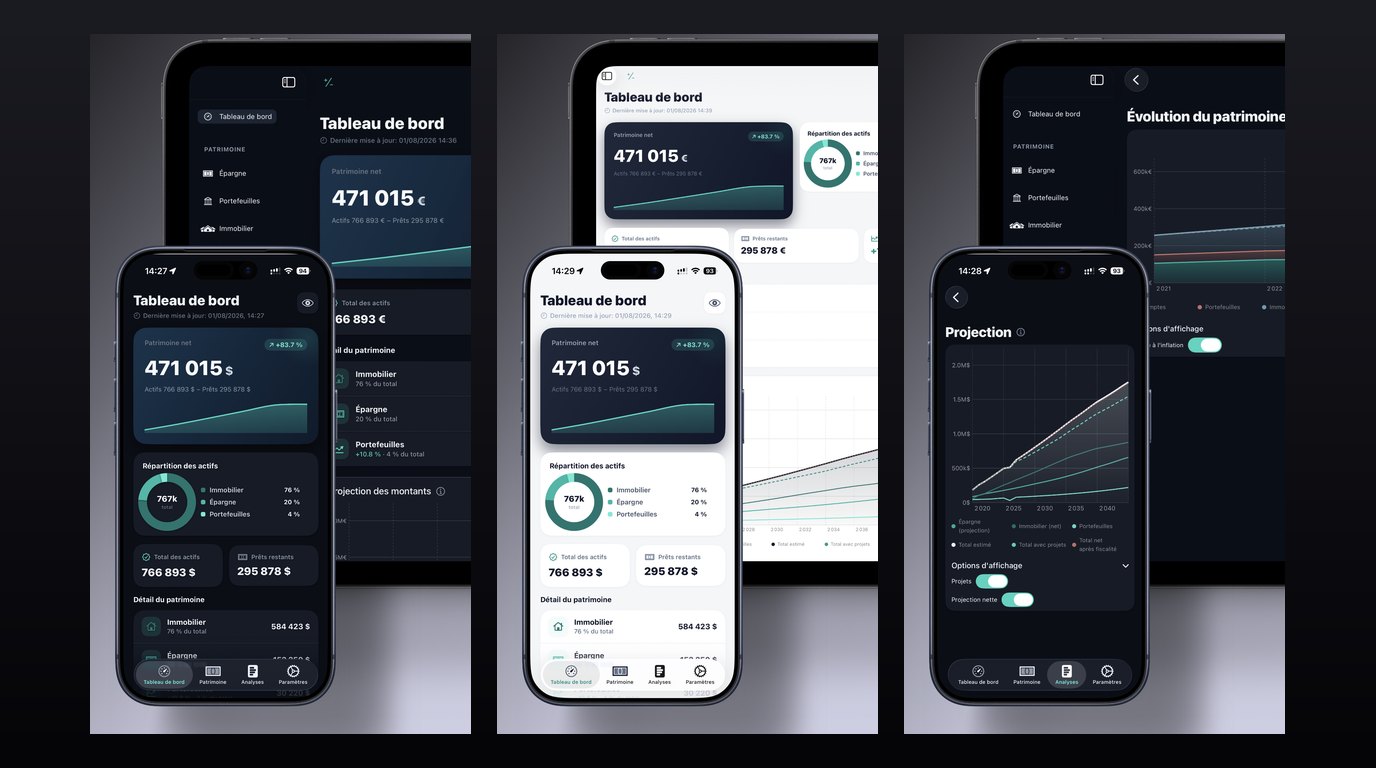
Every screen has been redesigned around a calmer palette and flat, readable cards, in both light and dark mode, on iPhone and iPad. Navigation, forms and charts now follow the same rules: a card looks the same everywhere, an amount reads the same way everywhere.
The most useful change is elsewhere: the dashboard now leads with your net worth and its trend, followed by your asset breakdown. That is the number you open the app for; it used to sit among indicators of equal visual weight.
2. Fewer screens, not fewer features
OneLedger has grown release after release, and a complete wealth app quickly starts to look like a cockpit. Version 2.5 takes the problem the other way round: secondary navigation sections are now hidden by default and can be switched on from Settings, when you actually need them. Nothing has been removed — the app simply starts on the essentials and grows with you.
Settings themselves are grouped into collapsible sections. So that long-time users don’t get lost, a brief guided tour points out what moved, replayable any time from Settings. Newcomers get a short introduction video instead.
3. More precise calculations
The core of the model — savings, portfolios, property, loans, projections — has worked since the early versions, and it hasn’t changed. What a calculation audit run before this release surfaced were edge cases: specific situations where the figure on screen deserved refining. There aren’t many, but they are worth naming rather than hiding behind “various fixes”.
- Debts in a foreign currency were being converted twice. This only affected loans denominated in a currency other than your reference currency, but when it happened the loan looked inflated and net worth understated.
- Net worth could differ between the dashboard and the Analysis screens, depending on how net real estate was counted. Two screens, two totals.
- The exported balance sheet didn’t always match the screen, which matters when that file is what you take to a meeting or a tax return.
- Portfolio history is now rebuilt from your actual purchase dates, rather than from when a position was entered into the app.
- Tax estimates apply social contributions on capital gains.
- A missing exchange rate now raises a warning, instead of the app silently treating two currencies as equal.
Expert mode was corrected on one point too: economic cycle detection was reporting recessions as expansions. It is a context indicator rather than a wealth calculation, but it had better point the right way round.
If one of these cases applied to you — a loan in a foreign currency, typically — your totals may shift slightly after updating. The new ones are the ones to trust.
4. Security
After several incorrect PIN codes, entry pauses for an increasing delay: a four-digit code can no longer be found by methodically trying all ten thousand combinations. PIN fields finally show the numeric keypad.
Beyond that, all data at rest is encrypted, and Settings now states which backup format can be restored on another device — a question support kept receiving.
Also in this release
- Scrolling on iPad has been fixed throughout the app.
- Card actions moved into press-and-hold menus, freeing up screen space.
- Many translation fixes in English, French and Spanish.
🔒 A reminder: what OneLedger does not do
No bank connection, no account to create, no Precellence server. Your data is encrypted and stays on your device, with local encrypted backups. Apple states it on the app listing too: no data collected. And a single purchase unlocks the full version — no subscription.
How to get it
OneLedger is available on iPhone, iPad and Mac, with a 14-day free trial. The 2.5 update is free for all existing users.
⚠️ Financial disclaimer ⚠️
Please note that this blog article is for informational and educational purposes only. It does not constitute financial advice, a financial recommendation, or a solicitation to subscribe to any financial products. The information presented here is based on general principles and does not take into account your personal situation, your risk tolerance, or your specific financial goals. Financial markets are subject to fluctuations and risks. Before making any investment decision, please consult a certified financial advisor.